Timmy's Tower
Levanta la torre bloque a bloque mientras los regalos de TikTok la derriban: cura, reconstruye y corre hacia la meta.


Sobre este juego
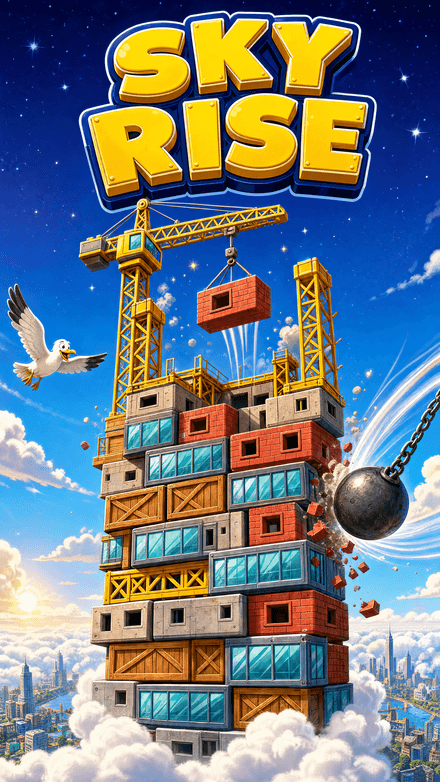
Timmy's Tower es un juego de apilar con un solo toque. Un bloque se balancea por la pantalla y tú lo sueltas: si calculas bien, la plataforma vuelve a ensancharse. Si fallas, el saliente se desprende y la torre se estrecha con cada caída descuidada.
Leer más
Mientras tanto, tu audiencia de TikTok Live juega en tu contra. Los regalos astillan la torre −1, la martillean −25, la cohetean −75 y la meteorizan −150, mientras un regalo Rosa reconstruye lo perdido y un Galaxy arrasa con todo en un final cinematográfico que termina la partida.
Los streamers fijan meta y punto de control con ajustes rápidos —1K, 100K o 1M— para que una sesión sea un sprint corto o una escalada maratoniana. La puntuación y todos los valores de los regalos se validan en el servidor, así que el número en pantalla siempre es el que te ganaste.
Características
Apilar con un toque
Los aterrizajes perfectos ensanchan la plataforma; los descuidados la adelgazan
Regalos de TikTok Live
Los espectadores astillan, martillean, cohetean, meteorizan, curan o arrasan tu torre en directo
Metas predefinidas
Fija meta y punto de control en 1K, 100K o 1M con un solo toque
Overlays de Studio
Altura de la torre y progreso de la meta como overlays listos para croma
Cómo se juega
- 1
Abre ScrollPlay
Juega en un navegador compatible en Windows, Mac, iPhone/iPad o Android, o usa el launcher de escritorio para Windows.
- 2
Inicia sesión
Crea una cuenta o entra con tus credenciales
- 3
Conecta TikTok
Escribe tu @usuario para que los regalos golpeen la torre en directo
- 4
Apila hasta la meta
Haz clic o pulsa ESPACIO para soltar cada bloque: aterriza limpio y corre a la meta antes de que los regalos la derriben
Regalos del público
Ataque (derribar la torre)
- Rose
- astilla, −1
- Gold Boxing Gloves
- martillo, −25
- Doughnut
- cohete, −75
- Confetti
- meteorito, −150
- Galaxy
- bomba nuclear: arrasa la torre y termina la partida
Apoyo (reconstruir la torre)
- Rosa
- reconstrucción: cura la torre hacia arriba
Todos los valores de regalo se validan en el servidor. Prueba cualquier acción desde el panel de Ajustes (⚙) del juego.
Jugabilidad: apilar hasta la meta
Timmy's Tower es un tira y afloja por una sola torre. Tú la construyes bloque a bloque —un toque suelta el bloque que se balancea, y un aterrizaje limpio vuelve a ensanchar la plataforma en lugar de recortarla—. Tu audiencia la derriba a golpe de regalos. Llega a la meta que fijaste antes de que la torre quede astillada, martilleada y meteorizada hasta la nada.
La puntuación, el daño de los regalos y las curaciones se calculan en el servidor con un nonce de sesión en cada acción, así que la altura en pantalla siempre refleja el juego real: un cliente manipulado no puede colarse hasta la meta.
Mecánica de regalos de TikTok
Como juego interactivo de TikTok Live, Timmy's Tower convierte los regalos en herramientas de demolición. Una Rose astilla un solo bloque para un rápido −1; un Galaxy arrasa la torre entera en un final cinematográfico que termina la partida en el acto.
Los regalos de apoyo contraatacan: Rosa reconstruye la torre y cura tu progreso hacia el punto de control. Los streamers eligen la apuesta desde el principio con metas predefinidas: 1K para un sprint, 1M para una escalada maratoniana.
Preguntas frecuentes sobre Timmy's Tower
¿Cuánto cuesta Timmy's Tower?
Timmy's Tower es un juego de Play Pass, así que lo cubre la suscripción en lugar de comprarse por separado. El launcher de ScrollPlay es gratis, y los títulos gratuitos son DEFUSE!, Jello Merge y Jaywalkin'; Timmy's Tower no es uno de ellos. Juega en un navegador compatible en Windows, Mac, iPhone/iPad o Android, o usa el launcher de escritorio para Windows.
¿Qué le hace cada regalo de TikTok a la torre?
Las asignaciones por defecto convierten los regalos en herramientas de demolición: una Rose arranca un bloque, los Gold Boxing Gloves se llevan 25 a martillazos, un Doughnut 75 a cohetazos y Confetti 150 a golpe de meteorito. El Galaxy es el remate: arrasa toda la torre con una nuclear en un borrado cinematográfico que termina la partida en el acto. Cada uno de esos valores vive solo en el servidor de ScrollPlay, y la copia que hay dentro del juego es un respaldo para la fracción de segundo antes de que se complete la conexión con el servidor.
¿Mis espectadores pueden reparar la torre además de destrozarla?
Sí. El regalo Rosa es la acción de apoyo: reconstruye la torre y devuelve tu progreso hacia el punto de control. Es una cura dinámica y no un número fijo, así que el servidor la ajusta según lo lejos que siga la torre del objetivo, y un solo regalo sigue mereciendo la pena tanto si te faltan 50 bloques como si te faltan 50.000. Los streamers fijan la potencia de esa cura desde el panel del juego, desde desactivada hasta cinco veces lo normal.
¿Cómo funciona la meta y qué estoy puntuando exactamente?
Tu puntuación es la altura de la torre. Una caída en el momento justo vuelve a ensanchar la plataforma, mientras que una descuidada corta el saliente y deja la torre más estrecha. Eliges la línea de meta al principio con ajustes rápidos de un toque —1K para un sprint rápido, 100K, o 1M para una escalada maratoniana—, y el servidor decide cuándo la altura la cruza, así que la celebración no se puede falsear desde la ventana del juego.
¿Qué necesito antes de salir en directo con Timmy's Tower?
Abre Web Launcher en Windows, Mac, iPhone/iPad o Android, o usa el launcher de escritorio para Windows. Inicia sesión, elige un juego y conecta tu TikTok LIVE en Studio. En un ordenador, captura la ventana del navegador o del juego; en el móvil, comparte la pantalla con las opciones de emisión disponibles para tu cuenta de TikTok. Este juego requiere un Play Pass activo. Los espectadores participan desde TikTok sin instalar ScrollPlay.
35 juegos hechos para TikTok LIVE